
Free Carpool App for Parents | GoKid
Goodbye text messages and Excel sheets: Hello GoKid. Download the GoKid app free today and coordinate school and activity carpools with families you trust. Get all premium features free when your school licenses GoKid Connect.
2 million+ carpool trips scheduled!
the Free GoKid Carpool App is also available here:


GoKid is a carpool coordination app that helps parents organize carpools for school and activities with families they trust. Schedule rides, get notifications, driving directions, track your child, and coordinate with your carpool group—all in one app. Available free on iOS, Android, and web.
Why families love Gokid
Carpool Planning has never been so easy.
Carpool planning in a snap
Organize the entire school carpool in 2 minutes: Simply set the locations, times, and dates then invite trusted families. GoKid takes care of the rest.
Safety features built in
No more guessing if a parent is driving or on their way. Our carpool apps have maps and you can track if the driving parent is on the way.

Stay organized even when plans change
Family plans change and GoKid is here to keep track: Need to opt out of a carpool or change your childs’ pick-up locations? Make changes with one tap, and your carpool group will know in real time.
Your trusted circle
Stay in control of who will be driving with you. No strangers or paid drivers. Only friends and families that you know and trust. GoKid offers a volunteer system – and will notify the entire carpool.
Your safety matters
When it comes to your kids, safety is key. Here is what Gokid does for your peace of mind.
Know Who is Driving
The parent who volunteered to drive will always show up in your schedule – you can contact them if needed. If a new driver is needed, your entire carpool will get a notification.
GPS and Routing
No more guessing where to pick up a child: The exact address appears on a map view. GPS and routing are helping the driving parent.
Never drive alone
The parent driver will always have their own child in the vehicle, and we GoKidroute the trip accordingly. Get notified when it’s time to go and when your child has arrived
Know Who is Driving
To start, the parent who volunteered to drive will always show up in your schedule – you can contact them if needed. If a driver is needed your entire carpool will get a notification.
GPS and Routing
Secondly, no more guessing where to pick up a child: The exact address appears on a map view. GPS and routing helping the driving parent.
Never drive alone
Finally, the volunteering driver will always have their own child in the vehicle and we will route the trip accordingly. Get notified when it’s time to go and when your child has arrived.
How it works
Here is how easy it is to plan your carpools:

Create a carpool & invite families

Volunteer to drive

Receive directions & best routes


Even more value with GoKid PRO
Our Premium carpool planner safety features:
- Live tracking
- Added notification controls
- See your carpool history
- Carpool notes
What others say about Us:


Frequently Asked Questions
What is GoKid?
The GoKid parent carpool app allows you to create a carpool group with other families in your community. You can schedule and manage carpool rides with your group, track pick-up and drop-off times, get notified of any changes, and communicate with other parents through the app. To get started, download the app from the Appstore, the Google PlayStore or register on the web.
What is Gokid Connect for Schools?
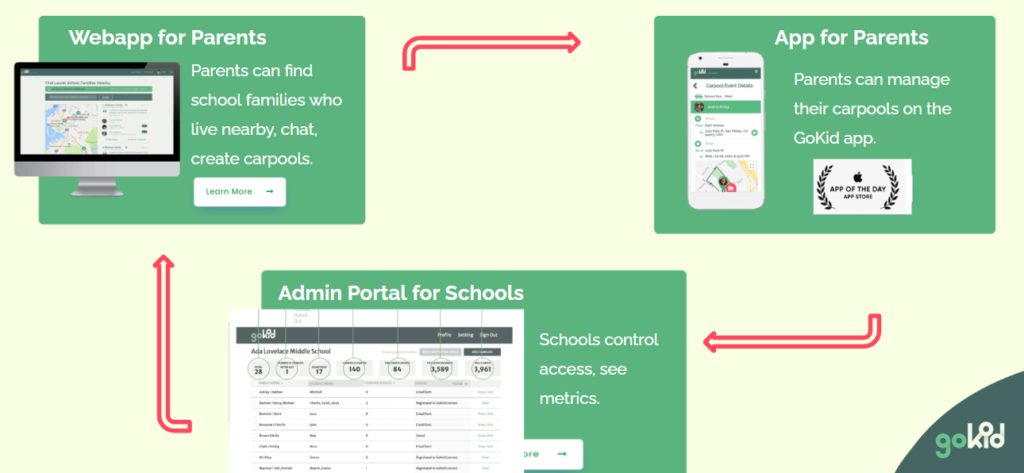
GoKid Connect is a school carpooling software that enables schools to organize carpools within their school community. Here’s how:
When school administrators launch Gokid Connect via their school admin portal, parents can:
- Use the it to locate nearby school parents with kids in similar grades who are also interested in carpooling.
- Organize carpools with ease and confidence
- Take advantage of software’s safety features, mapping, messaging, real-time tracking, and automated invitations.
Watch a video on how it works.
What is the Cost of GoKid Connect?
The cost of the program is structured as an annual Software-as-a-Service (SaaS) fee, based on the number and size of school, starting at $2999 for a petite school including customer support.
- Petite School (<200 students) Annual fee $ 1,999.00
- Small School (200-500 students): Annual fee of $3,999.
- Medium School (500-900 students): Annual fee of $5,999.
- Large School (900-1400 students): Annual fee of $7,999.
- Extra Large School (over 1400 students): Annual fee of $9,999.
There is also an annual technology and customer support fee of $1,000 -2,000 depending on the size of the school. Here’s what goes into our pricing.
For school districts and multiple year contraction, we offer significant discounts. Contact us at schools@gokid.mobi for a personalized quote.
What's the difference between GoKid and GoKid Connect?
GoKid App is for individual families to organize carpools with friends. GoKid Connect is for schools and districts to offer coordinated carpooling to their entire community. Learn more at our FAQ page
How does GoKid work for parents?
We’re so glad you found us! You need three things to get started on Gokid
1. A family
2. Somewhere your kids need to go
3. Friends with kids who also need to go somewhere
Once you’ve downloaded the app (Android or iOS) and registere you’ll simply create a profile and add your family members.
Just tap on “create” and follow the steps on the page to enter the carpool name, and when and where it happens. Then select friends to invite from your phone’s contact list or type their emails/phone numbers in manually. You can add a custom message to your carpool invitation as well.
When you save your carpool your invitations will be sent (if you added invitees). As your friends join, you’ll get notified by the app.
Lastly, volunteer to drive on the days that work best for you by scrolling through the schedule and tapping the red Select Driver button.
GoKid will ensure all participants can see the same schedule and everyone is kept reminded of when it’s their turn to participate or drive. We also plot the optimal driving route, and adjust if one or more of the kids aren’t participating on a specific date.
How much does GoKid cost for parents?
GoKid is available for free and includes all the core functionalities needed to set up and manage carpools. You can sign up now on Android, iOS or on our website. Families can also upgrade their accounts on a subscription basis to unlock additional features. The upgrade applies to every member of your family and will include life tracking of vehicles, the history of your carpools, chat functionalities. A monthly subscription is $4.99 / month. A yearly subscription is $49.99 / year.
Is GoKid safe?
- Only carpool with families that you know and trust.
- Add photos and, if available, phone numbers to your children in the profile settings so that the driving parent can easily identify your child.
- Add photos to your profile so children who carpool with you can easily identify you.
- Encourage other parents to do the same.
- Upgrade to Gokid PRO to see the live tracking of the vehicle and encourage your carpool group to do the same.
- Follow all traffic laws and ensure your vehicle is in good condition.
How do I set up my family account?
- Watch our video on how to set up your family.
- One adult registers for GoKid. If you have been invited by your school we already have one adult and one child in your profile.
- Go to your profile and select “add family member.”
- Add at least one child and, if applicable, another parent.
- The Family Members will get an invitation to join the family on GoKid setting their password.
- Pro Tip: Adding photos adds safety and a friendlier experience 🙂
Frequently Asked Questions
Not sure how Gokid works for your families’ carpooling needs? Glad you asked!
How does GoKid Work?
We’re so glad you found us! You need three things to get started on Gokid
1. A family
2. Somewhere your kids need to go
3. Friends with kids who also need to go somewhere
Once you’ve downloaded the app (Android or iOS) and registere you’ll simply create a profile and add your family members.
Just tap on “create” and follow the steps on the page to enter the carpool name, and when and where it happens. Then select friends to invite from your phone’s contact list or type their emails/phone numbers in manually. You can add a custom message to your carpool invitation as well.
When you save your carpool your invitations will be sent (if you added invitees). As your friends join, you’ll get notified by the app.
Lastly, volunteer to drive on the days that work best for you by scrolling through the schedule and tapping the red Select Driver button.
GoKid will ensure all participants can see the same schedule and everyone is kept reminded of when it’s their turn to participate or drive. We also plot the optimal driving route, and adjust if one or more of the kids aren’t participating on a specific date.
Where is GoKid available?
GoKid is available on iOS, Android, and web.
What does GoKid cost?
GoKid is available for free and includes all the core functionalities needed to set up and manage carpools. You can sign up now on Android, iOS or on our website. Families can also upgrade their accounts on a subscription basis to unlock additional features. The upgrade applies to every member of your family and will include life tracking of vehicles, the history of your carpools, chat functionalities. A monthly subscription is $4.99 / month. A yearly subscription is $49.99 / year.
How do I setup a Carpool?
To create a carpool simply tap on “Create” in the GoKid app. If you have more than one child, you will be first asked which of your children the carpool is for – you can select as many of your own children as you like to participate. Next, you’ll see the What/Where/When screen. Each of these sections asks a specific question about the carpool you are setting up.
What
Name your carpool.
Where
Set the locations the carpool is going from/to. Use the Kids Homes group as a placeholder for all the addresses of the participating children. As each family joins, they will set their own child’s specific address in this location group.
When
Set the start date of the carpool and the time the driver needs to get the kids to their event (or, for a ride where the kids are being dropped home after an event, set the time the driver needs to be at the event location to pick them all up). The “be at” location is the one that is time sensitive so it should always be the event location (e.g. “be at school by 8am to drop the kids off,” or ”Be at school at 3pm to pick all the kids up.””) Don’t forget to choose repeat options and an “until” date if this is a recurring event! On the next page, you’ll choose invitees:
Who
Select which families you want to invite to this carpool. If you aren’t sure, you can leave this section blank and invite them later by editing the carpool after it’s set up.
Custom Message
You can write a message to your carpool invitees, or leave the pre-filled text there. When you’re all set, just hit the button to send your invitations and create your carpool. As your friends join you’ll get notified.
How does my Family use GoKid? Do we each need to create an account?
At GoKid the Family shares a family account! Here is how it works
One adult starts the family account and adds other family members by going to your profile and pressing “add a family member.”
Choose if you are adding an adult or a child.
The password to the account is a SHARED family password. Once you have added family members to your profile, please provide them with the family password and they will be able to log in using that password and the email address you put in their profile.
Don’t forget to add pictures! It’s not a requirement but it makes it a lot friendlier when you send carpool invitations or view the schedule.